Wxpython
 From Handwiki
 | |
| Developer(s) | Robin Dunn Harri Pasanen |
|---|---|
| Initial release | 1998 |
| Stable release | 4.2.1[1]
/ June 7, 2023 |
| Written in | C++ / Python |
| Operating system | Cross-platform |
| License | wxWindows License |
| Website | wxpython |
wxPython is a wrapper for the cross-platform GUI API (often referred to as a "toolkit") wxWidgets (which is written in C++) for the Python programming language. It is one of the alternatives to Tkinter. It is implemented as a Python extension module (native code).
History
In 1995, Robin Dunn needed a GUI application to be deployed on HP-UX systems but also run Windows 3.1 within short time frame. He needed a cross-platform solution. While evaluating free and commercial solutions, he ran across Python bindings on the wxWidgets toolkit webpage (known as wxWindows at the time). This was Dunn's introduction to Python. Together with Harri Pasanen and Edward Zimmerman he developed those initial bindings into wxPython 0.2.[2]
In August 1998, version 0.3 of wxPython was released. It was built for wxWidgets 2.0 and ran on Win32, with a wxGTK version in the works.[3]
The first versions of the wrapper were created by hand. However, the code became difficult to maintain and keep synchronized with wxWidgets releases. By 1997, versions were created with SWIG, greatly decreasing the amount of work to update the wrapper.[2]
Project Phoenix
In 2010, the Project Phoenix began; an effort to clean up the wxPython implementation and in the process make it compatible with Python 3.[4] The project is a new implementation of wxPython, focused on improving speed, maintainability and extensibility. Like the previous version of wxPython, it wraps the wxWidgets C++ toolkit and provides access to the user interface portions of the wxWidgets API.[5]
With the release of 4.0.0a1 wxPython in 2017, the Project Phoenix version became the official version.[6] wxPython 4.x is the current version being developed as of June 2022.[7]
Use
wxPython enables Python to be used for cross-platform GUI applications requiring very little, if any, platform-specific code.
Example
This is a simple "Hello world" module, depicting the creation of the two main objects in wxPython (the main window object and the application object), followed by passing the control to the event-driven system (by calling MainLoop()) which manages the user-interactive part of the program.
#!/usr/bin/env python3

import wx

app = wx.App(False)  # Create a new app, don't redirect stdout/stderr to a window.
frame = wx.Frame(None, title="Hello World") # A Frame is a top-level window.
frame.Show(True)     # Show the frame.
app.MainLoop()
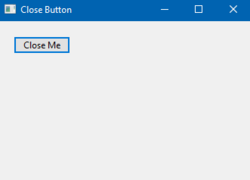
This is another example of the wxPython Close Button with wxPython GUI display show in Windows 10 operating system.
import wx

class WxButton(wx.Frame):

    def __init__(self, *args, **kw):
        super(WxButton, self).__init__(*args, **kw)
        self.InitUI()

    def InitUI(self):
        pnl = wx.Panel(self)
        closeButton = wx.Button(pnl, label='Close Me', pos=(20, 20))

        closeButton.Bind(wx.EVT_BUTTON, self.OnClose)

        self.SetSize((350, 250))
        self.SetTitle('Close Button')
        self.Centre()

    def OnClose(self, e):
        self.Close(True)

def main():
    app = wx.App()
    ex = WxButton(None)
    ex.Show()
    app.MainLoop()

if __name__ == "__main__":
    main()
License
Being a wrapper, wxPython uses the same free software license used by wxWidgets (wxWindows License)[8]—which is approved by Free Software Foundation and Open Source Initiative.
Applications developed with wxPython
- Chandler, a personal information manager
- Dropbox, desktop client for the Dropbox cloud-based storage[9]
- Editra, a multi-platform text editor
- Google Drive, desktop client for the Google cloud-based storage system[10]
- GRASS GIS, a free, open source geographical information system
- Métamorphose, a batch renamer
- Phatch, a photo batch processor
- PlayOnLinux and PlayOnMac, Wine front-ends
- PsychoPy, experiment creation tool for neuroscience and psychology research
References
Citations
- ↑ "wxPython Changelog" (in en). 2023-06-07. https://wxpython.org/news/2023-06-07-wxpython-411-release/index.html.
- ↑ 2.0 2.1 Team, The wxPython (2017-07-14). "wxPython History" (in en). https://wxpython.org/pages/history/index.html.
- ↑ "Yahoo! Groups : python-announce-list Messages :Message 95 of 1083". 2001-03-12. https://groups.yahoo.com/group/python-announce-list/message/95.
- ↑ "Goals of Project Phoenix". http://wiki.wxpython.org/ProjectPhoenix/ProjectGoals.
- ↑ "Project Phoenix readme file on GitHub". https://github.com/wxWidgets/Phoenix/blob/master/README.rst.
- ↑ Robin (2017-04-16). "wxPython 4.0.0a1 Release" (in en). https://wxpython.org/news/wxpython-4.0.0a1-release/index.html.
- ↑ Team, The wxPython (2020-11-21). "wxPython 4.1.1 Released" (in en). https://wxpython.org/news/2020-11-21-wxpython-411-release/index.html.
- ↑ "Copyright notice". http://docs.wxwidgets.org/stable/wx_copyrightnotice.html.
- ↑ "6 lessons from Dropbox one million files saved every 15 minutes".
- ↑ "Open source components and licenses". Google. https://support.google.com/drive/bin/answer.py?hl=en&answer=1716931&p=settings_licenses.
Sources
- Rappin, Noel; Dunn, Robin (March 1, 2006). wxPython in Action. Greenwich: Manning Publications. p. 552. ISBN 978-1-932394-62-7.
Further reading
- Precord, Cody (December 2010). wxPython 2.8 Application Development Cookbook. Greenwich: Packt Publishing. pp. 308. ISBN 978-1-84951-178-0.
External links
- wxPython Widget Tutorial Series
- Project Phoenix main page
- List of applications developed with wxPython
 |  |
Categories: [Free computer libraries] [WxWidgets]
↧ Download as ZWI file | Last modified: 04/30/2025 16:44:32 | 2 views
☰ Source: https://handwiki.org/wiki/Software:WxPython | License: CC BY-SA 3.0
 KSF
KSF